Color map effect
Applies a color-map effect on an object or layer.
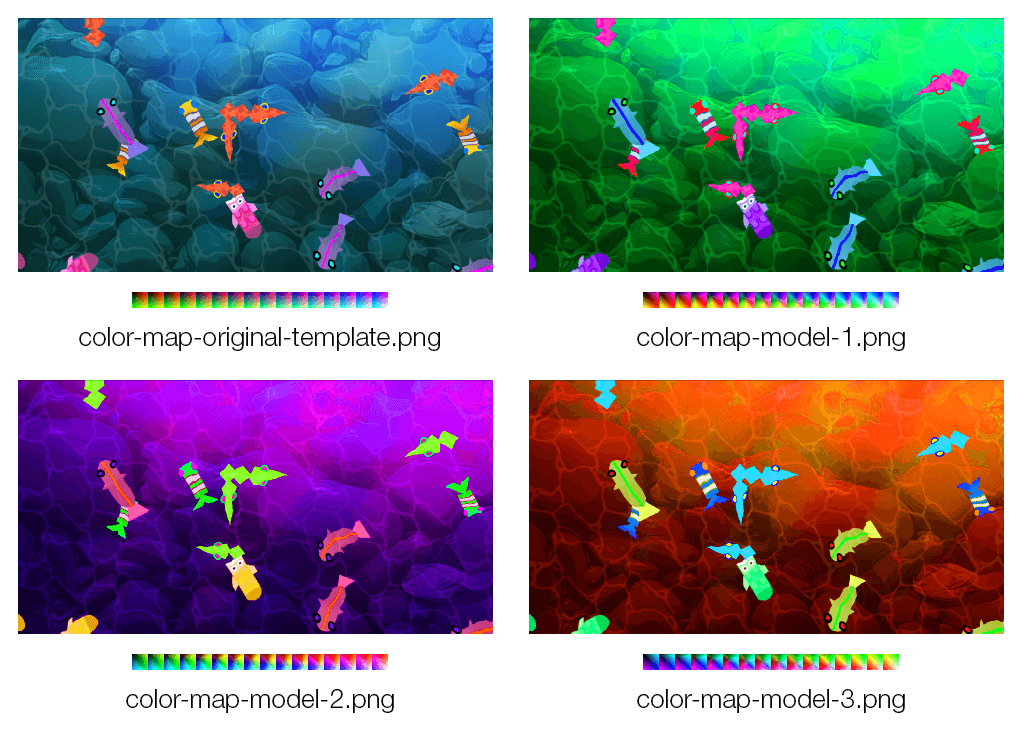
This works by modifying a reference "color image map" containing all possible colors.
Create your own color map
- Download the reference color map image:

- Use an image editor (like GIMP or Photoshop) to tweak the color the reference color image map with some filters. For instance, you can use GIMP Rotate Colors filter.
- Try some filters on your assets first to get an dea of the end result
- Once you found the right settings, apply the same filters to the reference color map image.
- Save it as a new file
- Use this new image as the color image map for the effect in GDevelop.
Try some ready-to-use color maps
- color-map-model-1.png :

- color-map-model-2.png :

- color-map-model-3.png :

The Mix setting (in percent) controls how strongly the new colors are applied, letting you blend between the original and remapped colors. Animating it with events is a convenient way to fade a color grading in and out — for example to tint the screen when the player enters a special area.
Reference
All effects are listed in the effects reference page.